
SEO basics: everything you need to know about search optimization
In today's digital world, search engine optimization is one of the most cost-effective marketing tools there is. A website's success isn't determined only by how it looks or what it says, but by whether the right people find it exactly when they need it. The most beautiful design or the most useful information counts for little if your website is invisible to the very people it's meant for.
There are two main ways to grow your online visibility: you can pay for traffic (through PPC – Pay-Per-Click ads), or you can reach your target audience organically (naturally), which is where SEO, or search engine optimization, comes in. On top of these there's also email marketing, social media marketing and plenty more. Ads bring instant traffic, but the moment you switch them off, the visitors disappear. SEO takes more attention and effort up front, but it pays off better in the long run, because it keeps bringing in customers without ongoing ad spend.
This guide walks you through the basics of SEO: how to make your website visible to Google, and how to attract visitors who show genuine interest in your products, services or content.
What is SEO, or search engine optimization?
Let's start at the very beginning. What exactly is SEO?
What SEO means: SEO stands for Search Engine Optimization – the practice of optimizing your website so search engines can find, understand and rank it.
Search engine optimization is a practice or set of activities that help you build your website in a way that fits search engine algorithms as well as possible, so they display your pages more often and in higher positions on the results page of a search engine (e.g. Google).
As the image shows, organic (free) results appear below the paid ads (PPC) on Google's results page. They're easy to tell apart, because organic results don't carry a "Sponsored" or "Ad" label.
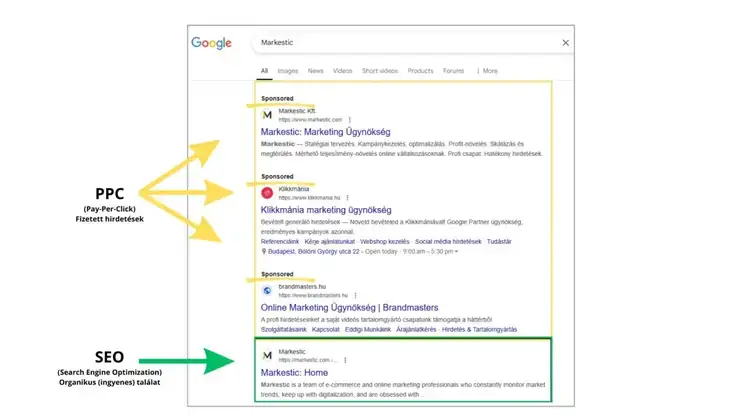
The search engine that defines the rules of SEO
But what is a search engine, when SEO is the topic? It's a system that crawls and maps billions of pieces of content, evaluates them against thousands of factors, and then decides which specific piece of content is the most relevant result for the person doing the search.
A lot has changed on the search results page over the past few years too. Where ads and organic results used to be clearly separated, results pages today are far more dynamic and hide ads far more subtly. Take answer boxes, for example, which show the answer to your question right away. You don't even have to click a link to land on a page that's likely to be relevant.
Larger search engines include, for example:
- Microsoft Bing
- Yahoo!
- DuckDuckGo
- YouTube
And of course there are plenty of other search engines out there beyond these.
What search engines are trying to do
Search engines – Google in particular – develop their engine with one goal: to make sure users always find the most relevant, most trustworthy and most up-to-date information. That's why they constantly improve their algorithms, fine-tune search ranking and enhance the user experience. SEO plays a key role in this: search engines reward the websites that are technically sound, offer relevant content and deliver real value to visitors with better rankings.
Their goal is to offer real answers, reliable sources and quality results for every search – and that's exactly why users choose them again and again.
So the aim of search engines is to win returning users. That's good for them, of course, because it lets them show even more ads, which companies pay them for.
How do search engines work?
- Crawling: the discovery phase, when the search engine uses bots to look for new and relevant content.
- Indexing: a huge database, an inventory where the search engine stores the information it finds about the pages it has discovered.
- Ranking: when someone searches, the search engine ranks the pages in its index and tries to show the best possible match for the search term the person typed in.
+Tip: Although search engines recognize more and more images these days, the technology still isn't fully mature. If you want to be really good, always give your image a text description (alt text) in your website editor. This helps the search engine define what the user can see in the image more easily.
Google ranking
Google's ranking system exists to show users the most relevant and most trustworthy results possible for their searches. When ranking, Google takes many factors into account, such as the quality of a website's content, its credibility, the user experience and its technical soundness. The goal is for the search engine to provide the best answers to users' questions as efficiently as possible.
Google algorithm updates
Google rolls out algorithm updates regularly to improve the accuracy of search results and to filter out low-quality or manipulative content. These updates refine the ranking criteria, so relevant, useful and trustworthy pages can move up, while less valuable pages slip down. The goal is always the same: to give users the best possible answers to their searches, and to keep improving the search experience.
The areas of SEO
Search engine optimization (SEO) is made up of several components that together help a website rank better in search engine results. There are three main areas of SEO, each of which plays a key role in building a successful online presence:
- On-page SEO
- Optimizing the content and structure of the page. This includes proper use of keywords and optimizing headings and meta descriptions.
- Off-page SEO
- Managing the links that point away from your site, as well as the references coming in from external websites. Quality link building is key here.
- Technical SEO
- Improving the technical elements of the site, such as site speed and mobile-friendly design.
How to create SEO-friendly content for your website
First and foremost, write for your users, not for the search engine!
When doing SEO, it's easy to fall into the trap of tailoring your content solely to what the search engine expects, and not to your readers.
- Don't deceive your users
- Don't use tricks for the sake of the search engine. Ask yourself: Is this information useful to my users? Would I still do it if search engines didn't exist? If the answer is yes, then do it
- Think about what makes your website unique and valuable.
How NOT to create content for your website
- Don't use automatically generated content without reviewing it
- Don't publish content that isn't original (stolen, copied from others, duplicated)
- Don't show the search engine something different from what you show users
- Don't hide text and links on the page
Keyword research
Now that we've covered the basics of how search engines work, let's turn to how you can use the right keywords on your website. But before we dive in, it's important not to pick your keywords arbitrarily. Instead, think like your users and try to work out how someone would actually search for your product or service.
Search volume
We start keyword research by looking at the most basic search terms. These usually return a higher search volume. For example, if you sell pizza, you might see several thousand searches a month for "pizza", but you don't necessarily want to appear to everyone who searches for pizza. If you only deliver pizza in downtown Budapest, you'd much rather appear only to people who are in downtown Budapest.
Online tools for SEO and keyword research
These tools can give you concrete data for the keyword research you do as part of SEO.
On-page SEO, or optimization within the page
A simple formula for content creation:
- Find the keywords you want to rank for
- Identify the pages that currently rank near the top for those keywords
- Work out what strengths those pages have
- Create better content than theirs
Formatting your content
While there's no way to predict how many people will read your content, there are a few ground rules worth following to improve the user experience.
- Text size and color – Never pick a font that's too thin, and keep your font size at 16 or above. At that size you already minimize things like pinch-zooming on phones.
- Headings – Breaking up your text with headings and subheadings helps your readers a lot. If someone is only interested in a certain part, they can find it far more easily.
- Lists – These help your reader find the information relevant to them more easily.
- Spacing between paragraphs – This lets you reduce the number of people who leave the page and encourages your readers to read more of what's on it.
- Supporting media – Where it fits, break up the text with images and videos.
- Bold and italic emphasis – You don't need it everywhere all the time, but used well it helps the reader find their way around too