
You type in the keyword you wanted to show up for at all costs, and nothing. You can't find your own ad. Meanwhile, there's your competitor's, staring right back at you.
Disappointment in your heart, maybe even anger, because this isn't what you paid the agency "serious" money for. You check again later in the day, still nothing.
This is the point where you call up your agency to ask how on earth this is possible.
Let us explain.
Why your ads aren't showing
There are countless possible reasons, but none of them is cause for despair.
There's no valid payment method
An obvious case, of course, but if you happen not to have set up a proper payment method in the account, or if Google declined the payment method, then no matter how much work the agency or you yourself put into your campaigns, they won't be able to launch. You can check this under the payment settings in Google.
Ads pending review
It's possible the campaign was created recently and Google hasn't approved the ads yet. This can sometimes take longer than 1 business day. You can check this in the Ads and extensions section of your Google account. If the status of your ads is Pending, you'll have to wait a little longer for your ads to show.
Disapproved ads
In a small percentage of cases it can also happen that everything is set up perfectly, but the campaigns still don't launch because the ads have been disapproved. In this case it's worth getting in touch with support.
Your ads actually are showing
You've done your detective work, everything's set up, the ads are active, the agency says everything's fine too, but no matter how much you search for yourself on Google, your ad never shows.
How is this possible?
Very simple. Let's do a quick calculation.
You allocate 5,000 Ft a day to a campaign. On average, let's say a click costs 100 Ft. That means you have enough money for 50 clicks a day. Let's take an average click-through rate of 10%, so on average 10 out of every 100 people click on your ad. (We hope you know that just because your ad shows, it's not guaranteed the user will click on you, rather than on the competition or an organic result.)
If we take the calculation further, Google works it out like this: if you have enough money for 50 clicks a day, then you can show up in Google at most 500 times that day, because that's how much you can afford. 500 searches.
Let's suppose you operate in a very popular industry, and your important keywords are searched 2,000 times in a day. As you can see, with the budget you've set you can only show up on a quarter of the searches, and on 75% of searches your ad doesn't appear at all.
And when you type your own keyword into Google, you might fall right into that missing 75% yourself, so don't start worrying.
How to check on your Google Ads
If that calculation shocked you a little, let's go the Sherlock detective route instead.
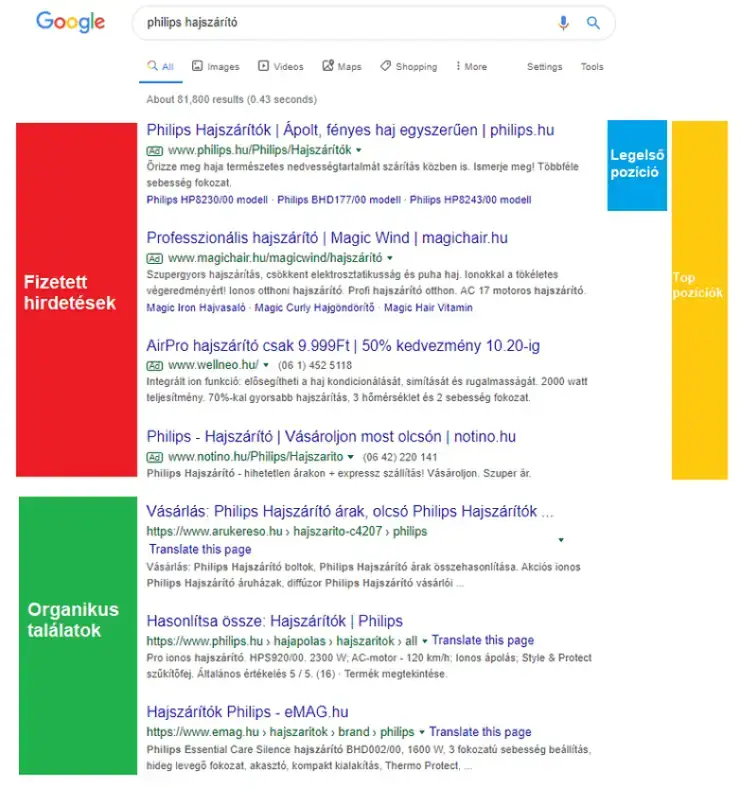
The numbers never lie. Ask your agency for a report on the following:
-
- Impressions – how many times the ads appeared for a given campaign (if this is greater than 0, you can be sure your ads are running)
- Clicks – how many times users clicked on your ad (this is your website's traffic coming from Google Ads)
- Search impression share – the percentage of searches related to your keywords in which you managed to appear (essentially how big your "market share" is in the ads)
- Lost impression share (budget) – this shows what proportion of your "market loss" is due to a low, that is, insufficient, budget. So if this metric is 90%, it means the main problem is low spend relative to the size of the market.
- Lost impression share (rank) – with this metric you can find out what proportion of your "market loss" is due to inadequate ad position. If you see a high value here, the problem may lie with the quality of your ads and your cost per click.
- Impression (Absolute Top) rate – in this case you get a picture of what proportion of the auctions in which your ad appeared you were in the very first position, in other words at the very top of the page.
- Impression (Top) rate – this odd-sounding metric shows what proportion of the auctions in which your ad appeared you were in the first 2 or 4 positions, above the organic (unpaid) results
What does your ad look like?
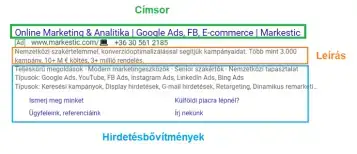
You're surely curious to see what your ads look like in all their glory, which is part of why you keep frantically searching Google for them.
If you look yourself up on Google a lot (weekly, or heaven forbid daily), you're depriving your campaigns of many of the impressions and clicks you launched them for, the ones meant to bring in real prospects.
Since you pay for campaigns per click, you obviously don't click on your own ad (your competitor's, sure, let them pay), and by doing so you send Google the message that your ad isn't attractive enough. With all that pointless looking, you're lowering the quality of your own ads.
So there are two ways to go: either click on your ads so the quality score doesn't suffer, or don't search for yourself at all.
If you're curious about what your ads look like and how they appear in search, we recommend the methods below.
Ad Preview and Diagnosis tool
With this tool, in your Google Ads account, you can see whether you'd show up for a given keyword in a specified geographic location and on a specified device (e.g. mobile) at that moment. This is essentially a simulation tool that imitates Google Search.
And if you're not showing up because of some specific error, the system spells it out.
If you don't show up, again, don't panic: just like in Google's real search, you won't appear here 100% of the time either.
Ad preview
The simplest way to actually experience what your ads look like is this: in your Google Ads account, open one of your ads in edit mode, and then the ad appears in its most ideal imaginable form, with all the extensions you've set up.
Google Search
If you do go digging around in Google after all, don't forget that how your ads appear is also determined by which position and on which device you show up.
Google gives you the largest ad space in the very first position, especially on desktop, so it's mainly in this case that your longer ad copy and all your ad extensions can appear.
In cases where you don't appear in the top position, Google doesn't necessarily show your full ad, only the main messages.
What determines your ad's position?
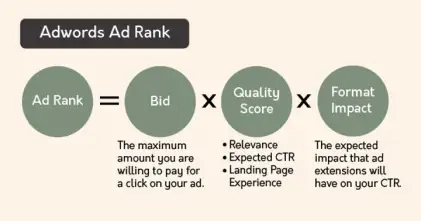
Compared to a fixed paid ad in a newspaper, the position of your Google Ads search ad depends on a huge number of factors. Let's take a peek!
Quality Score
By Google's definition, the Quality Score is an "estimate of the quality of your ads, keywords and landing pages." Essentially it shows how good the quality of your ads is: whether your ad copy reflects the searches users type in, whether your landing page contains relevant information about the ad and the search, and much more besides.
But why does Quality Score matter?
Google gives preference to high-quality ads, and penalizes poorer-performing ads with higher costs per click. So the better your Quality Score, the more cheaply you win a click.
The Quality Score sits on a scale from 1 to 10. A 1 signals the weakest performance; below 5 you're still in the danger zone, so aim to optimize for values above 7.
Let's look at the components of the Quality Score!
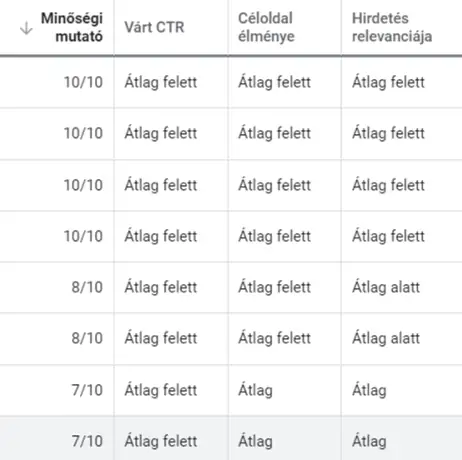
Ad relevance
By Google's definition, ad relevance shows how closely a given keyword relates to your ads, for example whether the keyword shows up in the ad's copy. But just think about it: if you were searching Google for "Adidas men's shoes", which would you be happier with? Ad copy that says "Wide selection of men's shoes" or "Adidas men's shoes"? Which one would you rather click?
Landing page experience
Landing page experience points to how relevant and useful your landing page is (the part of the website where you direct people from the ad). If the website is easy to navigate, fast and mobile-friendly, you're onto a winner. If the page falls apart completely on mobile and takes a thousand years to load, neither Google nor the consumer will appreciate it, and they'll leave you after the 2nd second.
Expected CTR (click-through rate)
Expected CTR estimates how attractive the ad for a given keyword is, based on the past performance of your ad account's keywords and the ad extensions you've set up.
Cost-per-click bid
Every time a user searches, your Google Ads keywords enter an auction, a competition, where others are also bidding on that keyword. If you offer too little for it, you can easily drop out of the game, or you'll appear in a low position. The good news, though, is that if your Quality Score is good, you can land in the top spots even with a lower bid. The bad news is that if your ads are very poor quality, Google "rewards" this with expensive costs per click, and even then it won't necessarily let you anywhere near the honey pot, that is, the top positions.

If you only read 5 points from this article…
- Don't go searching for your own ads on Google. Doing so hurts the quality of your ads, and over the long run it drives up the cost per click you have to pay for them.
- If you're unsure whether your ads are showing, check with the agency, or ask them for the stats, such as the number of impressions.
- Small money, small game. If you're tight-fisted with your spend, your market share will be small too, and you won't be able to appear for every search (every potential buyer).
- Your ad's position depends on the quality of your ads and the cost-per-click bid you've set. The better your Quality Score, the cheaper the click. Poor ads, on the other hand, get penalized by Google with high costs per click.
- If you can, leave campaign management to the pros. 🙂