
A setup that takes just ten minutes can save you a world of headaches.
"In 2023 we will begin retiring Universal Analytics"
This is where you made a huge mistake.
Next June, your future self will be furious with you when, a week before the switch, you finally take a closer look at what Google is actually saying in that email, and realize it wasn't for nothing that you'd been getting reminders about the change for over a year. Because a year from now it will be far too late to start using GA4, and anyone who only wakes up then will be at a huge disadvantage compared to their competitors.
Luckily, though, you found your way here, so let us help protect your future self from this fatal mistake.
So what is GA4?
GA4 – in full, Google Analytics 4 – is the next generation of Analytics, enabling more advanced and more sophisticated measurement than its predecessor.
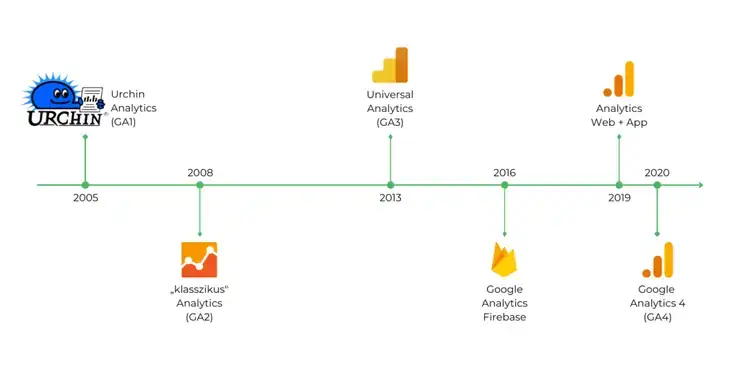
The original, classic Analytics was replaced in 2013 by Universal Analytics (Google Analytics 3, or UA/GA3 for short). Alongside it came Firebase, used for developing mobile apps, in 2016, as well as the beta of the Google Analytics Web + App system in 2019. The unified version of these is the newly launched Google Analytics 4, which will completely replace the current Universal Analytics in July 2023. After 1 July 2023, Universal Analytics will no longer collect any data (the data it contains will still be available to view for another six months).
Let's finally get to the point: why do I need to set up GA4 right now?
Unlike the switch to Universal Analytics back in 2013, the current UA data CANNOT be migrated into the new GA4 system. The new Analytics works in a completely different way, collecting, storing and displaying data differently from UA, so importing the data isn't possible. That's why, if you don't want to have to start collecting data from scratch when the switch happens, it's worth setting up GA4 as soon as possible so that by July you'll have more than six months' worth of data in it.
More arguments for implementing GA4 as soon as possible:
- Collecting data in both systems in parallel lets you compare the impact the changes in the new tracking system have on how your data is measured.
- You'll be able to analyze the reason if you spot a big discrepancy somewhere, and it'll be easier to notice if something was accidentally set up wrong.
- You'll have time to test what settings you need to extract the data you require from the system, and to build your new reports.
- You can get comfortable with the new features and how the new interface works at a relaxed pace.
There are a lot of changes in GA4 compared to Universal Analytics, so give yourself time to get to know the interface and get used to the differences. Even if it's hard at first, plenty of new features will make your measurements easier and more accurate in the long run.
How do Universal Analytics and Google Analytics 4 differ?
The biggest difference between the two systems is the new user- and event-based tracking instead of the earlier session-based measurement. While tracking sessions was justified in the past, by now the constant advance of technology has completely changed user behavior, so it hasn't given a satisfactory picture of users' actual behavior for a long time. Not to mention how poorly UA handled tracking mobile apps.
So in the new system, URL-based tracking and page loads are no longer at the center, user behavior is.
Measuring engagement instead of bounce rate
We have to say goodbye to several widely used metrics, such as bounce rate, pageviews per session, or session duration. Instead, GA4 measures the average engagement time: how much time a user actually spends browsing your content.
Based on this, we can track engaged sessions, which are the sessions during which the user
- spends at least 10 seconds browsing our content and/or
- visits 2 or more pages and/or
- performs at least one conversion event on our site.
Dividing engaged sessions by all sessions gives us the engagement rate, which we'll track in the future instead of bounce rate.
So if someone reads all the way through a blog post, for example, or performs a conversion event right away on the first page they open, that counts as engagement rather than a bounce as it did before (because only a single page load happened) – which, let's be honest, is closer to reality than lumping them into one category with people who just opened the page and then closed it. This is especially important when tracking activity carried out in mobile apps, where navigating across multiple pages is far less common.
Users and events instead of sessions and pageviews
Universal Analytics currently starts a new session in the following cases:
- after 30 minutes of inactivity
- at midnight
- when the acquisition dimension changes (the medium/source/campaign changes)
GA4, by contrast, only starts a new session after 30 minutes of inactivity, not in the other two cases, so under GA4 we'll see far fewer sessions for the same number of users.
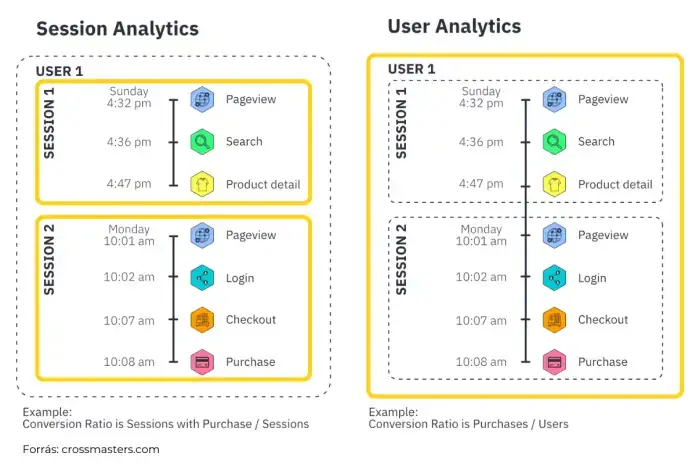
This is part of the measurement model transformed under GA4, which no longer focuses on sessions and pageviews but on users and events. The earlier UA hit types are all recorded as events in GA4, with various event parameters. So even a pageview counts as just a simple event in the new system.
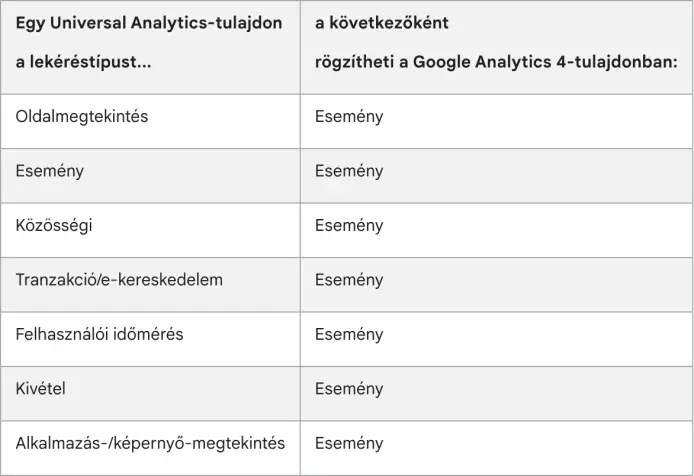
Instead of UA's earlier category-action-label-value event hierarchy, GA4 operates with an event-event parameter-user property model, so GA4 reports don't display a category, action or label either. Events, on the other hand, can have up to 25 event parameters, which can be text or numbers. User properties, meanwhile, describe groups within your user base (for example their language settings or their geographic locations).
Types of events
GA4 distinguishes four types of events:
- Automatically collected events: events that GA4 collects automatically from the moment the base code is installed, such as pageviews, first views, and the start of new sessions (page_view, first_visit, session_start).
- Enhanced measurement events: Google Analytics also collects these automatically from websites when enhanced measurement is enabled in the property, for example scrolls, outbound clicks, file downloads, video views, etc.
- Recommended events: you have to implement them manually, but they have names and parameters predefined by Google.
- Custom events: if you can't find a suitable one among the above for an event, you can create your own.
When using event measurement, it's recommended to work through the above in order, use the automatically collected events wherever possible, and if you can't find what you need among them, reach for the enhanced measurement events, and so on.
More accurate tracking across websites and mobile apps
GA4 uses the same schema for web and in-app tracking – unlike Universal Analytics – which makes it possible to track users across different devices too, linking the same user's activity on a computer and on a phone.
Goal completion / conversion
While UA measured a single conversion (goal completion) per session, GA4 tracks every conversion event a user completes. You can set any event that matters to you as a conversion, whether it's any click on the site, a video view, or a form submission.
Data protection and modeled data
Data protection is an increasingly central topic these days, there are ever-stricter regulations to comply with, and users are becoming more aware in this area too, so the various browsers and devices are offering their users more and more privacy options. As a result, tracking users' activity and being able to target them is getting harder all the time.
GA4 aims to comply with the ever-stricter data protection rules by using Privacy Consent Mode. This way part of the data measurement is preserved and will appear in reports, but users can no longer be retargeted based on IP address, for example (the IP address is personal data under the GDPR, which is why GA4 handles it separately).
Even so, measuring data with the earlier accuracy isn't possible, so GA4 supplements the measured data using machine learning. In the future this will be an increasingly strong trend, that decisions have to be based, alongside the measured data, more and more on the predictive data estimated by the algorithm.
Views
In GA4 there are no views, but we can organize several of our websites and mobile apps into a single property, so cross-domain measurement is also possible.
Reports
There are fewer of the pre-built reports many people used; GA4 relies more on custom reports, so be prepared that you'll have to create and configure your own reports, even if you previously felt Universal Analytics' default reports were enough.
Filtering out fake data
Instead of the easily faked Tracking ID used by UA, GA4 also uses a secret key that isn't publicly available, so it can even completely eliminate unwanted referral traffic.
Data retention
In UA, several options were available for data retention: 14 months, 26 months, 38 months, 50 months, "do not expire."
For GA4 properties, the retention period for user-level data – including conversions – can be a maximum of 14 months. For other event data you can choose between 2 and 14 months, but regardless of your settings, the system only retains age, gender and interest data for 2 months.
What should I do?
The most important thing is to set up GA4 as soon as possible so it can start collecting data.
Beyond that, we also recommend that you
- save your data from Universal Analytics: after the switch, the data in UA will still be available for 6 months, so do this by the end of next year at the latest.
- once GA4 has started measuring your data too, compare it with the data measured by UA and analyze them in parallel, so you can see what impact the changes will have on the reporting and analysis of your results.
How can I set up GA4?
If you use a webshop engine to manage your online store, look for their guides (here you'll find the Shoprenter and Unas guides, for example).
Adding a GA4 property to a website that already runs Universal Analytics
- In the Google Analytics interface, click Admin in the bottom left corner.
- In the Account column, check that the correct account is selected.
- In the Property column, select the UA property that is currently collecting data.
- Also in the Property column, click GA4 Setup Assistant.
- Under "I want to create a new Google Analytics 4 property" » Get started
- Select the "Enable data collection using your existing tags" option, then Create property.
After this, thanks to the predefined events, measurement of the most important events starts automatically.
If your website/CMS uses analytics.js tags rather than gtag.js (the "Enable data collection using your existing tags" option didn't appear), follow Google's instructions here.
If you don't have a Google Analytics account yet, the GA4 property will be included by default when you create one.
If you get stuck during setup, get in touch with our expert team!